Veebiteenused.
Kontrolltöö.
SOA
Service-oriented
architecture (SOA) - Arhitektuur , mis kasutab
- teenuseid organisatsiooni integrastiooni ehitusklotsidena
- komponentide taaskasutust läbi nõrga seotuse.
SOA: On arhitektuur - Mingi hulga teenuste tegemine ei anna meile SOA-d.
- Arhitektuur peab andma meile juhised teenuste loomiseks.
SOA: Ehitatakse teenustest - Nagu objekt-orienteeritud maailmas on objekt/klass nii on SOA-s teenuses peamine komponent .
- Ilma teenusteta pole meil millestki ehitada, midagi jälgida (monitor) ega käivitada.
SOA: integratsioon - SOA esindab ühte võimalust süsteemide integratsiooniks.
- Erinevate süsteemide kokkuühendamise võib lahendada mõne P2P lahendusega palju kiiremini.
- Samas võib minna alternatiivide puhul ka palju rohkem aega, kuna süsteemid räägivad erinevat keelt (sõnumite formaat).
- SOA kasutab sõnumivahetuses XML-i.
SOA: nõrk seotus - SOA-s püütakse teha nõrgalt seotud komponente, ehk teenuseid, mis ei tea midagi klientidest, kes neid kasutama hakkavad.
SOA: taaskasutus - Pole alati hädavajalik.
- Samas, kui ühegi komponendi taaskasutus võimalust pole ega näe ka tulemas, siis on tõenäoliselt tegu üle mõeldud lahendusega ja kindlasti mitte SOA-ga.
SOA müügijutt.. - Kattes oma süsteemi selgroo ( mission critical) veebiteenustega, mis opereerivad SOA raamistikul, saad sa kergesti
- laiendatava,
- taaskasutatava ja asendatava lahenduse
- SOA annab meile raamistiku , kus mitmed mittefunktsionaalsed nõuded on juba täidetud.
- Näiteks turvalisus
- Arendajad keskenduda äriprobleemidele.
VEEBITEENUS - A Web service is a service offered by an electronic device to another electronic device, communicating with each other via the World wide web. In a web service, web technology such as the HTTP, originally designed for human-to- machine communication , is utilized for machine-to-machine communication, more specifically for transferring machine readable file formats such as XML and JSON . In practice, the web service typically provides an object -oriented web based interface to a database server , utilized for example by another web server, or by a mobile application, that provides a user interface to the end user. Another common application offered to the end user may be a mashup, where a web server consumes several web services at different machines , and compiles the content into one user interface.
Veebiteenus
tähendab
programmide omavahelist suhtlemist ja andmevahetust üle hariliku
veebi.
- Veebiteenus on üle veebi (http) välja kutsutav (käivitatav) meetod (protseduur või funktsioon).
- Veebiteenust kutsutakse välja mingis kindlas formaadis sõnumiga (nt. SOAP ) ja vastus saadakse samuti selles formaadis.
- Sarnaselt tavaliste funktsioonidega saab ka veebiteenuse väljakutsel määrata sisendparameetreid.
- A software system designed to support interoperable machine-to-machine interaction over a network
- It has an interface described in a machine-processable format ( WSDL )
- Other systems interact with the Web service in a manner prescribed by its description using SOAP-messages, typically conveyed using HTTP with an XML serialization in conjunction with other Web- related standards
Veebiteenus - Veebiteenus on üle veebi (http) välja kutsutav (käivitatav) meetod (protseduur või funktsioon).
- Veebiteenust kutsutakse välja mingis kindlas formaadis sõnumiga (nt. SOAP) ja vastus saadakse samuti selles formaadis.
- Sarnaselt tavaliste funktsioonidega saab ka veebiteenuse väljakutsel määrata sisendparameetreid.
Pilt veebiteenuste abil
integreerimisest - Erinevad platvormid ja programmeerimiskeeled
- Erinevad kasutajaliidesed ühel kesksüsteemil
- Erinevad organisatsioonid
- Varjatud realisatsioon
- Kliendi ja teenusepakkuja sõltumatu arendus
Veebiteenuste eelised..Veebiteenuste puudused… - Erinevate platvormide rakenduste koostöö võimaldamine
- Teksti põhised ja avatud standardid on arendajale arusaadavad
- Annavad võimaluse erinevate ettevõtete erinevas kohas asuvaid rakendusi ja teenuseid integreerida üheks uueks teenuseks
- Veebiteenuste taaskasutamise võimalus
- Kasutusvõimalused - Web services can be published, found, and used on the Web. SOA arhitektuur kasutab teenuseid.
XSD - An XML Schema describes the structure of an XML document .
- The XML Schema language is also referred to as XML Schema Definition (XSD).
- XSD põhjal tekkib XML
STANDARDID XSDXSD - XML
Schema Definition - XSD kirjeldab XML dokumendi struktuuri
XSD võrdlused andmebaasi tabelite ja java klassidega - XSD – Document structure
- Table structure
- Class definition
- XML – Document instance
- Record in a Table
- Object instance
XSD määrab.. - Millised elemendid ja atribuudid tohivad olla dokumendis
- Millised elemendid on alamelemendid
- Alamelementide järjestuse ja arvu
- Kas element on tühi või sisaldab teksti
- Andmetüübid elementide ja atribuutide jaoks
- Vaikimisi ja fikseeritud väärtused elementidele ja atribuutidele
- Piirangud
The purpose of an XML Schema
is to
define the
legal building
blocks of an XML document:
- the elements and attributes that can appear in a document
- the number of (and order of) child elements
- data types for elements and attributes
- default and fixed values for elements and attributes
- Mida saab XSD-ga XML dokumendis määrata?
XML Schemas define the elements of
your XML files.
A simple element is an XML element
that contains only text. It cannot
contain any other elements or
attributes.
What
is a Simple Element?
A simple element is an XML element
that can contain only text. It cannot contain any other elements or
attributes.
However , the "only text"
restriction is quite misleading. The text can be of many different
types. It can be one of the types included in the XML Schema
definition (boolean,
string ,
date , etc.), or it can be a
custom type
that you can define yourself.
You can also add restrictions (facets)
to a data type in order to limit its content, or you can
require the
data to match a
specific pattern.
Defining
a Simple Element
The syntax for defining a simple
element is:
where xxx is the name of the element
and yyy is the data type of the element.
XML Schema has a lot of
built -in data
types. The most common types are:
- xs:string, decimal, integer , Boolean, date, time
Example
Here are some XML elements:
Refsnes
36
1970-03-27
All
attributes are declared as simple types.
Simple elements cannot have
attributes. If an element has attributes, it is considered to be of a
complex type. But the
attribute itself is always declared as a simple
type.
How
to Define an Attribute?
The syntax for defining an attribute
is:
where xxx is the name of the attribute
and yyy specifies the data type of the attribute.
XML Schema has a lot of built-in data
types. The most common types are:
- xs:string, decimal, integer, Boolean, date, time
The
simpleType element defines a simple type and specifies the
constraints and information about the values of attributes or
text-only elements.
Element
Information
Ei ole alamelemente
Siia sisse lähevad restrictionid
- Parent elements: attribute, element, list, restriction, schema, union
Võivad olla alamelemendidThe complexType element defines a
complex type. A complex type element is an XML element that contains
other elements and/or attributes.
Element
Information
- Parent elements: element, redefine, schema
Restrictions
are used to define acceptable values for XML elements or attributes.
Restrictions on XML elements are called facets.
- Lokaalsed elemendid ja tüübid on sisemise elemendi sees
- Globaalsed elemendid ja tüübid on ruutelemendi sees
WSDL
WSDL on keel, mis kirjeldab
veebiteenuseid
- WSDL stands for Web Services Description Language
- WSDL is used to describe web services
- WSDL is written in XML
An
WSDL document describes a web service. It specifies the
location of
the service, and the methods of the service, using
these major
elements:
Operatsioonid
- The operation element defines each operation that the portType exposes.
Sõnumid
- Defines the data elements for each operation
Andmetüübid
- Defines the (XML Schema) data types used by the web service
Defines the (XML Schema) data types used by the web service
Defines the data elements for each operation
Describes the operations that can be performed and the messages
involved.kirjeldab operatsioone ja nende
sisend -väljund sõnumeid
Defines the protocol and data format for each port type -
määratakse sõnumivahetuse transport iga operatsiooni kohta
(document+literal recommended)
–
nimi ja asukoht
- Alamosad ja nende ülesanded
- types
- message
- portType
- binding
- service
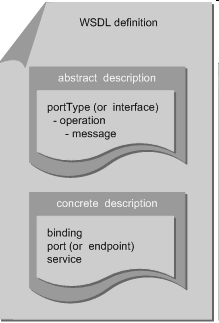
WSDL’i elemendid... ... ... ... ... WSDL’i elemendid - Types – siin saame XSD importida või kohapeal deklareerida
- Messages – iga requesti ja response jaoks on siin üks sõnum
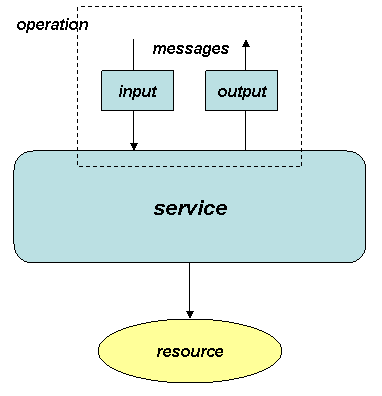
- PortType – kirjeldab operatsioonid ja nende sisend ning väljund sõnumid.
- Binding - määratakse sõnumivahetuse transport iga operatsiooni kohta (document+literal recommended)
- Service – nimi ja asukoht
Näide :
WSDL
asukoht - Tüüpiliselt
asub WSDL aadressil:
Näiteks
http://localhost:9999/hello?wsdl SOAP - SOAP stands for Simple Object Access Protocol
- SOAP is an application communication protocol
- SOAP is a format for sending and receiving messages
- SOAP is platform independent
- SOAP is based on XML
It is
important for web applications
to be
able to communicate over the
Internet .
The
best way to communicate
between applications is over HTTP, because HTTP is supported by all Internet
browsers and servers. SOAP was created to accomplish this.
SOAP provides a way to communicate
between applications running on different operating systems, with
different technologies and programming
languages .
- It is important for web applications to be able to communicate over the Internet.
- The best way to communicate between applications is over HTTP, because HTTP is supported by all Internet browsers and servers. SOAP was created to accomplish this.
- SOAP provides a way to communicate between applications running on different operating systems, with different technologies and programming languages.
The
required SOAP Envelope element is the
root element of a SOAP message.
This element defines the XML document as a SOAP message.
...
Message information goes here
...
- The optional SOAP Header element contains application-specific information (like authentication, payment , etc) about the SOAP message.
- If the Header element is present , it must be the first child element of the Envelope element.
- Note : All immediate child elements of the Header element must be namespace-qualified.
234
- The example above contains a header with a "Trans" element, a "mustUnderstand" attribute with a value of 1, and a value of 234.
- The required SOAP Body element contains the actual SOAP message intended for the ultimate endpoint of the message.
- Immediate child elements of the SOAP Body element may be namespace-qualified.
Example
Apples
- The example above requests the price of apples. Note that the m: GetPrice and the Item elements above are application-specific elements. They are not a part of the SOAP namespace.
- A SOAP response could look something like this:
1.90
NIMERUUM
- Nimeruum (namespace) on lihtsalt loogiline (elementide ja tüüpide) nimede grupeering
- Nimeruumis peavad nimed olema unikaalsed
- Ühes XSD failis defineeritakse üks nimeruum
Selleks, et vältida elementide nimede
konflikte.
- XML Namespaces provide a method to avoid element name conflicts.
-
Name Conflicts
- In XML, element names are defined by the developer . This often results in a conflict when trying to mix XML documents from different XML applications.
- Ülesanded
- Grupeerib
- Tagab elemendi unikaalsuse
- Kasutamine
Namespaces
in Real Use
XSLT is a language that can be used to
transform XML documents into other formats.
The XML document
below , is a document
used to transform XML into HTML.
Järgnevad mustrid erinevad
ühe asja poolest - Nende elemendid ja tüübid on kas lokaalselt või globaalselt defineeritud.
- Globaalne element või tüüp on schema alamelement.
- Lokaalne element või tüüp on defineeritud mõne teise elemendi või tüübi sees.
- Lokaalseid elemente ei saa taaskasutada.
Muster “Russian Doll”Muster “Salami Slice”Muster “Venetian Blind” - Üks juurelement on globaalne
- Kõik tüübid on lokaalsed
- Kõik elemendid on globaalsed
- Kõik tüübid on lokaalsed
- Üks juurelement on globaalne
- Kõik tüübid on globaalsed
XMLMõisteXML
is a software- and hardware-independent
tool for storing and
transporting data.
XML stands for
EXtensible Markup Language.
XML was designed to store and transport data. XML was designed to be
both human- and machine-readable.
Komponendid
- Elemendid ja nende väärtused
An
XML element is everything from (
including ) the element's start tag to
(including) the element's end tag.
29.99
An element can contain:text,
attributes, other elements, or a mix of the above
Harry Potter
J
K.
Rowling 2005
29.99
Learning
XML
Erik
T.
Ray
2003
39.95
In the example above:
,
, , and have
text
content because
they contain text (like 29.99).
and have
element
contents,
because they contain elements.
has
an
attribute (category="
children ").
XML elements must
follow these naming
rules :
- Element names are case -sensitive
- Element names must start with a letter or underscore
- Element names cannot start with the letters xml (or XML, or Xml, etc)
- Element names can contain letters, digits, hyphens, underscores, and periods
- Element names cannot contain spaces
Atribuudid ja nende väärtused - XML elements can have attributes, just like HTML.
- Attributes are designed to contain data related to a specific element.
- Attribute values must always be quoted. Either single or double quotes can be used.
- For a person 's gender , the element can be written like this:
-
- or like this:
-
- If the attribute value itself contains double quotes you can use single quotes, like in this example:
-
XML
Elements vs. Attributes
Take a look at these
examples :
Anna
Smith
female Anna
Smith
In the first example gender is an
attribute. In the last, gender is an element. Both examples provide
the
same information.
There are no rules about when to use
attributes or when to use elements in XML.
XML
Namespaces provide a method to avoid element name conflicts.
Name
Conflicts
In XML, element names are defined by
the developer. This often results in a conflict when trying to mix
XML documents from different XML applications.
This XML carries HTML table information:
Apples
Bananas
This XML carries information about a table (a
piece of furniture):
African Coffee Table
80
120
If these XML fragments were added
together, there would be a name conflict. Both contain a element, but the elements have different content and
meaning .A user
or an XML application will not
know how to
handle these
differences .
Solving
the Name Conflict Using a Prefix
Name conflicts in XML can easily be
avoided using a name prefix.
This XML carries information about an
HTML table, and a piece of furniture:
Apples
Bananas
African
Coffee
Table
80
120
In the example above, there will be no
conflict because the two elements have different names.
XML
Namespaces - The xmlns Attribute
When using
prefixes in XML, a
namespace for
the prefix must be defined.
The namespace
can be defined by an
xmlns attribute
in the start tag of an element.
The namespace
declaration has the
following syntax. xmlns:
prefix="
URI".
Apples
Bananas
African
Coffee
Table
80
120
Süntaks -The
syntax rules of XML are very simple and
logical . The rules are
easy to learn, and easy to use.
XML
documents must contain one root element
that is the
parent of
all other elements:
XML
Documents Must Have a Root Element
.....
In
this example is
the root element:
Tove
Jani
Reminder
Don't
forget me this
weekend !
This
line is called the XML
prolog :
The XML prolog is optional. If it
exists, it must
come first in the document.
XML documents can contain
international
characters , like
Norwegian øæå or French êèé.
To avoid errors, you should
specify the encoding used, or save your XML files as UTF-8.
UTF-8 is the default
character encoding for XML documents.
All
XML Elements Must Have a Closing Tag
XML
tags are case sensitive. The tag is different from the tag .
Opening and closing tags must be
written with the same case:
This
is incorrect
This
is
correct In
XML, all elements
must be
properly
nested within each other:
This
text is bold and italicJSONJSON on süntaks
andmete salvestamiseks ja vahetamiseks.
JSON
( JavaScript Object Notation)
- Nimi-väärtus
paaride kollektsioon
- JSON: JavaScript Object Notation.
- JSON is a syntax for storing and exchanging data.
- JSON is an easier -to-use alternative to XML.
- The following JSON example defines an employees object, with an array of 3 employee records:
JSON Example
,
-
- The JSON syntax is a subset of the JavaScript syntax.
JSON syntax is derived from JavaScript
object notation syntax:
- Data is in name/value pairs
- Data is separated by commas
- Curly braces hold objects
- Square brackets hold arrays
JSON eelised:Saab parsida standard JS funktsiooniga,
parsimine lihtsam
Simplicity
XML is simpler
than SGML, but JSON is much simpler than XML. JSON has a much smaller grammar and maps more directly onto the data
structures used in modern programming languages.
Extensibility
JSON is not extensible because it does not need to be. JSON is not a document markup language, so it is not
necessary to define new tags or attributes to represent data in it.
Interoperability
JSON has the same interoperability potential as XML.
Openness
JSON is at
least as
open as XML,
perhaps more so because it is not in the
center of corporate/
political standardization struggles.
XML eelised: XML is human readable
JSON is much easier for human to read than XML. It is easier to write, too. It is also easier for machines to read and write.
XML can be used as an exchange format to enable users to move their data between similar applications
The same is true for JSON.
XML provides a structure to data so that it is richer in information
The same is true for JSON.
XML is easily processed because the structure of the data is simple and standard
JSON is processed more easily because its structure is simpler.
There is a wide range of reusable software available to programmers to handle XML so they don't have to re-invent code
JSON, being a simpler notation,
needs much less specialized software. In the languages JavaScript and
Python , the JSON notation is built into the programming language; no additional software is needed at all. In other languages, only a small
amount of JSON-specific code is necessary. For example, a package of three simple
classes that
makes JSON available to Java is available for free from
JSON.org.
XML separates the presentation of data from the structure of that data.
XML
requires translating the structure of the data into a document structure. This mapping can be complicated. JSON structures are based on arrays and records. That is what data is made of. XML structures are based on elements (which can be nested), attributes (which cannot), raw content text, entities, DTDs, and other meta structures.
A common exchange format
JSON is a better data exchange format. XML is a better document exchange format. Use the right tool for the right job.
Many views of the one data
JSON does not provide any
display capabilities because it is not a document markup language.
XPath
XPATH on
päringukeel XML dokumentidest informatsiooni otsimisest nagu SQL on
päringukeel andmebaasi tabelitest otsimiseks.
Pärime välja kõik title’d
- /CATALOG/CD/TITLE
- //TITLE
Pärime välja kõik cd’d,
mille hind on suurem kui 10
- XPath is used to navigate through elements and attributes in an XML document.j
- XPath uses path expressions to select nodes in an XML document. The node is selected by following a path or steps. The most useful path expressions are listed below:
ExpressionDescriptionnodename Selects all nodes with the
name "nodename"
/ Selects from the root node
// Selects nodes in the document from
the
current node that match the
selection no matter where they are
. Selects the current node
.. Selects the parent of the current
node
@ Selects attributes
Relative
vs. Absolute paths
In HTML, you can specify an
Absolute
Path for the hyperlink,
describing where another page is with the server name, folders, and
filename all in the URL. Or, if you are referring to another file on
the same site, you need not enter the server name or all of the path
information. This is called a
Relative
Path. The
concept can be
applied similarly in XPath.
If
location path starts with the node that we've selected then it is an
relative path. If location path starts with root node or with '/'
then it is an absolute path.
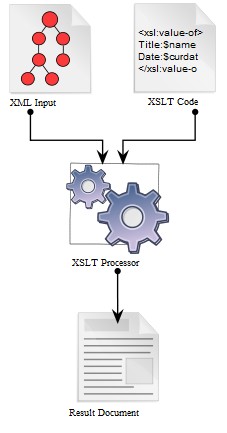
XSLT - Mõiste – andmete teisendamiseks XMList
- Selle sees oli kasutatud XPath
- XSLT on XML-põhine keel XML dokumentide mingisse teise formaati teisendamiseks.
- XSLT kirjeldab reeglid, millega lähtepuu (source tree) transformeeritakse tulemuspuuks ( result tree).
- Lähtepuust päritakse andmeid kasutades XPATH-i.
Milleks kasutatakse? - Andmete konverteerimiseks erinevate XML Schema-de vahel (meie kasutame samuti).
- XML andmete HTML-ks või XHTML -ks konverteerimiseks (näide 1).
- XML andmete tavaliseks tekstiks või PDF-ks või mõneks muuks dokumendiks konverteerimiseks.
XSLT protsessorid - XSLT protsessorid võivad olla kliendi- või serveripoolsed.
- Mitmetesse JAVA ja .NET-i jt raamistikesse on XSLT protsessorid juba sisse ehitatud.
- XSL stands for EXtensible Stylesheet Language, and is a style sheet language for XML documents.
- XSLT stands for XSL Transformations. In this tutorial you will learn how to use XSLT to transform XML documents into other formats, like XHTML.
XSLT
is a language for transforming XML documents into XHTML documents or
to other XML documents.
REST REST is
an
architecture style
for designing networked applications. The
idea is that,
rather than
using complex mechanisms such as CORBA, RPC or SOAP to connect
between machines, simple HTTP is used to make calls between machines
In computing, representational state
transfer (REST) is the software architectural style of the World Wide
Web.
- Põhimõtted – igal teenusel on oma URL. IGALE TEENUSELE OMA URI
REST
(querying
a phonebook) - Hea näide:
- Halb näide
- Veel halvem näide
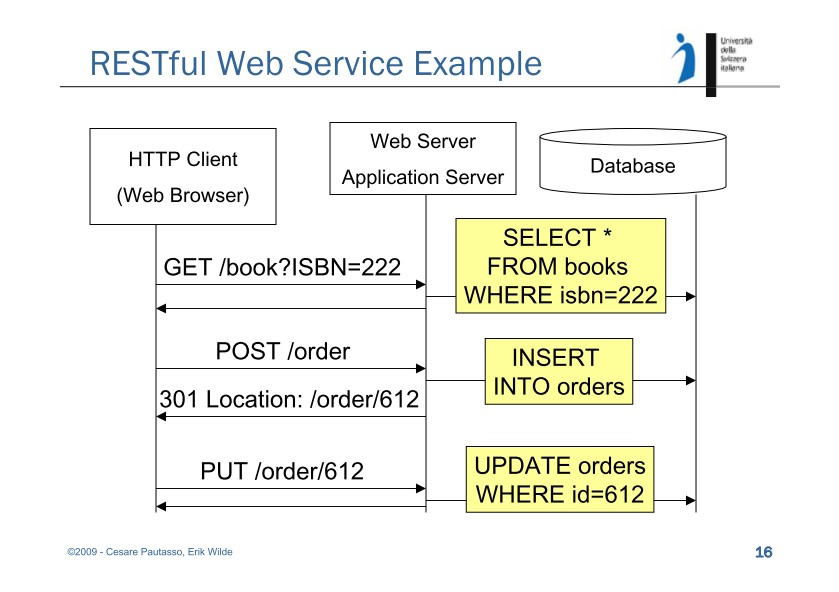
- REST provides a lighter weight alternative. Instead of using XML to make a request, REST relies on a simple URL in many cases. In some situations you must provide additional information in special ways, but most Web services using REST rely exclusively on obtaining the needed information using the URL approach . REST can use four different HTTP 1.1 verbs (GET, POST, PUT, and DELETE ) to perform tasks.
- REST doesn’t have to use XML to provide the response. You can find REST-based Web services that output the data in Command Separated Value (CSV), JavaScript Object Notation (JSON) and Really Simple Syndication (RSS). The point is that you can obtain the output you need in a form that’s easy to parse within the language you need for your application.
- Ressurss - Kõik asjad, mille poole on vaja pöörduda, on ressurssid. Toimub eraldi URIga.
- Resources are the key abstractions in REST.
- They are the remote accessible objects of the application.
- A resource is a unit of identification.
- Everything that might be accessed or be manipulated remotely could be a resource.
Uniform
Resource Identifier, is a string of characters used to identify a
resource
ühtne
ressursi-indikaator Internetis leiduvail tarkvaralistel
võrguressurssidel (HTML dokumendid, pildid, videoklipid,
programmid ,
muusika jne) on igaühel oma
unikaalne URI, mis määrab kindlaks
ressursi nime (URN) ja aadressi (URL), mis näita ära, kust ja
kuidas võib seda ressurssi kätte saada
- REST teenuse kirjeldamise vahendid
- SOAP ja REST teenuste turvalisus. RESTil pole spetsiifilist turvalisust
Ligipääsu piiramine - http/s autentimise kasutamine
- access_token
- teenusepakkuja lahendus (kasutaja küsib teenusepakkujalt access tokeni)
- kolmanda osapoole kaudu ( kasutades OAuth, OpenID vms lahendust )
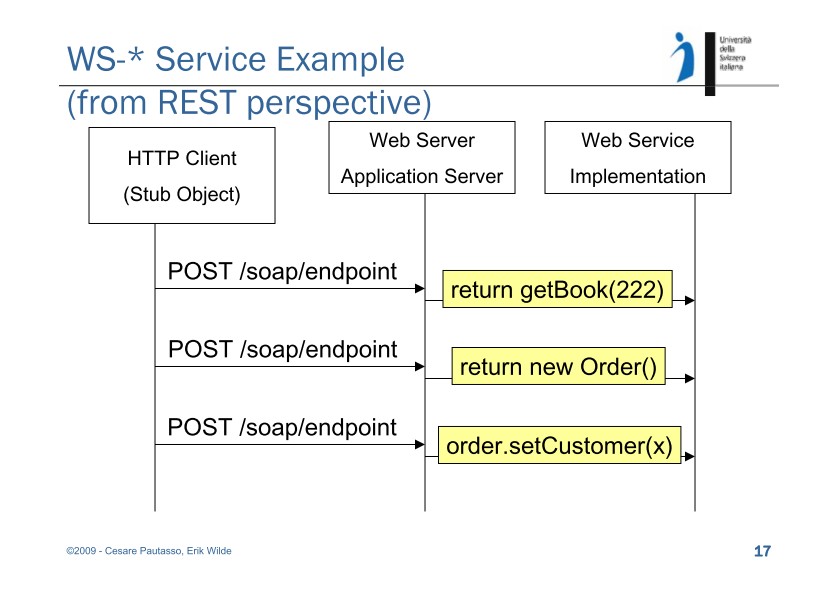
Järgnevad REST ja WS-* näited 50 punkti
Autor soovib selle materjali allalaadimise eest saada 50 punkti.
50 punkti
Autor soovib selle materjali allalaadimise eest saada 50 punkti.
 ~ 20 lehte
Lehekülgede arv dokumendis
~ 20 lehte
Lehekülgede arv dokumendis
 2016-04-12
Kuupäev, millal dokument üles laeti
2016-04-12
Kuupäev, millal dokument üles laeti
 56 laadimist
Kokku alla laetud
56 laadimist
Kokku alla laetud
 0 arvamust
Teiste kasutajate poolt lisatud kommentaarid
0 arvamust
Teiste kasutajate poolt lisatud kommentaarid
 AnnaAbi
Õppematerjali autor
AnnaAbi
Õppematerjali autor
 annaabi.ee






Kõik kommentaarid