Tallinna Tehnikaülikool Raadio- ja
sidetehnika instituut
Projekt ainetes ,,IRT0030 Andmeside"
ja
,,IRT0100 Kommunikatsioonivõrkude
struktuurid ja teenused"
teemal
«
VoIP teenus»
Üliõpilane: Ruslan Karpovits Õpperühm: IATM Matrikli nr: 050829 Õppejõud: Avo Ots
Tallinn
2008
Author 's word
This
project is written to show some
interesting aspects of
working with VoIP (
Voice over
Internet Protocol ) service. The project briefly describes the
process of
finding a
solution for
based VoIP problem and its realization.
-2- Contents
Introduction .............................................................................................................................. - 4 -
Mission ....................................................................................................................................... - 5 -
Solution...................................................................................................................................... - 5 - Scheme .................................................................................................................................... - 5 -
Components ............................................................................................................................ - 5 - Configuration ......................................................................................................................... - 7 - Monitoring.............................................................................................................................. - 8 -
Price ..................................................................................................................................... - 10 -
Conclusion ............................................................................................................................... - 10 -
Referencies .............................................................................................................................. - 11 -
-3- Introduction
VoIP is a
solid technology available since some
years that allows people to communicate via
voice using the IP protocol instead of
telephone lines.
Unfortunately this technology has been
relegated in a niche market due to
several factors
such as proprietary standards, high price tag,
limited integration with existing telephony environments.
However in the last couple of years the
situation changed dramatically since some
open source tools such as asterisk as well as low-
cost VoIP telephone adapters and
services become available. In
fact ,
today it is quite common for
internet providers to
provide their customers VoIP calls at very low cost, if any, in
addition to
standard xDSL connectivity.
The VoIP uses Internet protocol (IP) to
send digitized voice
traffic over the Internet or private
networks . An IP packet
consists of a
train of digits containing a
control header and a data
payload. The header provides
network navigation information for the packet, and the payload
contains the compressed voice data.
While circuit -switched telephony deals with the
entire message , VoIP-based data transmission is
packet-based, so that chunks of data are packetized (separated into units for transmission),
compressed, and
sent across the network--and eventually re-assembled at the designated
receiving end. The key point is that
there is no need for a
dedicated link
between transmitter and
receiver.
Packetizing voice data involves adding header and
trailer information to the data blocks.
Packetization overhead (additional time and data introduced by this process) must be reduced to
minimize added latencies (time delays
through the system).
Therefore , the process must achieve
a balance between minimizing transmission delay and using network bandwidth most
efficiently --smaller
size allows packets to be sent more often, while larger packets take longer to
compose. On the
other hand , larger packets amortize the header and trailer information across a
bigger
chunk of voice data, so they use network bandwidth more efficiently
than do smaller
packets.
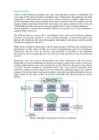
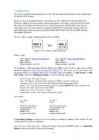
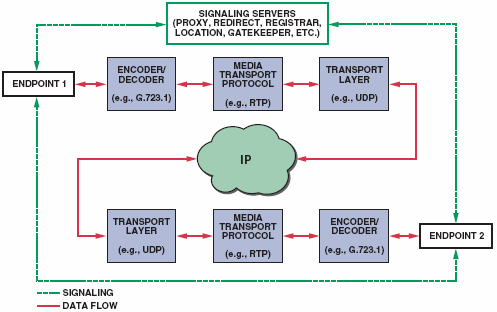
Figure 1.Signaling and transport flows between endpoints.
-4- Mission
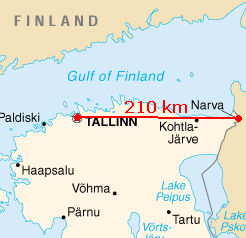
We are a company that provides Voice over IP telephony over Estonia. Our mission is to make
for some company IP telephony
connection , which offices are
located in Tallinn and Narva.
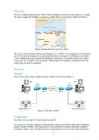
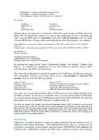
Figure 2.Range between customer offices
We need to provide
them with
fair speech quality (3,5 phones , as
workers will be speaking through computer IP telephone applications. It is hoped that this will reduce
some
costs . So, we need to
find a solution, whitch
requires IP telephone connection itself, its
monitoring and
proper equipment .
Solution
Scheme
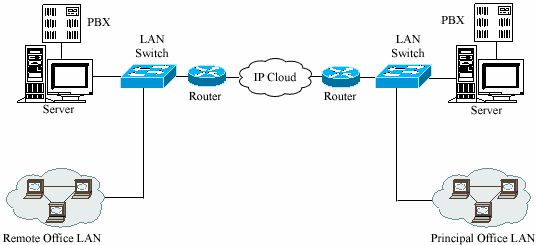
First of all we have made a
simple scheme, which you can see on Figure 3.
Figure 3.The main scheme
Components
Secondly, for our project we need proper equipment.
As a servers we use the
computers with
operating system
Linux and an open source telephony
engine Asterisk IP-PBX. Asterisk possesses all possibilities of classical
automatic telephone
exchange , supports most of VoIP protocols and provides functions of voice mail, conferences, -5- the interactive voice
menu (IVR), the
centre of processing of calls - statement of calls to
turn and
their distribution on
agents using various algorithms,
record CDR and other functions.
On the one hand, the
server is connected with telephone lines and can
incorporate to any
phone of the world. On the other hand, the server is connected with the Internet and can contact any
computer in the world. The server accepts a standard telephone
signal , digitizes it (if it initially
not
digital ), considerably compresses, breaks into packets and
sends through the Internet to
destination point with use of the protocol TCP/IP. For the packets
coming from the Network on a
telephone server and
going out in a telephone line,
operation goes upside-down.
Both making operations (a signal input in a telephone system and its
exit from a telephone system)
occur practically simultaneously that allows to provide fullduplex
conversation .
In each office
building we put a broadband
router and the
necessary quantity of switches. In our
case we have 95 worksites, so we need 2 switches with 48
ports each.
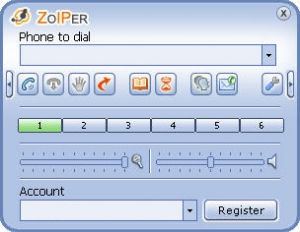
As VoIP
client we use Zoiper, which is a IAX and SIP softphone for
Windows , Mac OS X and
Linux. We
chose it as its
user -friendliness,
diversity and richness of features set new standards
for functionality and perfection. Also Zoiper offers great simplicity with enhanced
interface to
bring a
smooth and satisfying VoIP communications experience.
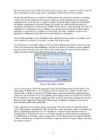
Figure 4.The Zoiper' interface
Also it is necessary to
choose the right
audio codec for VoIP transmission which ensure us the
right quality of MOS from 3,5 to 4. In this case the
best choice for us will be a G.729 codec a
speech codec, with the low-
latency G.729 audio data-compression algorithm, which partitions
speech into 10-ms
frames . It uses an algorithm called conjugate-structure ACELP (CS-ACELP).
G.729 compresses 16-bit
signals sampled at 8 kHz via 10-ms frames into a standard bit
rate of 8
kbps, but it also supports 6.4-kbps and 11.8-kbps rates. In addition, it supports voice-activity
detection and comfort-noise generation.
Video conferences are too
important for our customer. For video codec we chose the default
H.261. This standard,
developed in 1990, was the first widely used video codec. It introduced the
idea of segmenting a
frame into 16 3 16 "macroblocks" that are tracked between frames to
establish
motion -compensation vectors. It is mainly targeted at videoconferencing applications
over
ISDN lines (p 3 64 kbps, where p
ranges from 1 to 30). Input frames are
typically CIF (352
3 288) at 30 frames-per-second (fps), and output compressed frames occupy 64 kbps to 128 kbps
for 10-fps resolution.
-6- Configuration
We need to configure our equipment for
work . The most important
part here is the configuration
of Asterisk PBX stations.
Firstly, it must be mentioned that for our mission we use a SIP protocol (Session Initiation
Protocol), which is used for
creation , change and rupture of sessions:
transfer of any data from
the sender to the addressee between one or several participants. SIP describes only
rules of
connection between devices, therefore together with SIP the information transfer protocol is
used. SIP uses for data transmission protocols RTP (
Real -Time Protocol) and SDP (Session
Description Protocol).
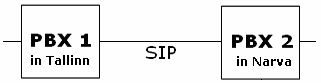
So, let's make a simple configuration between two PBXs.
Figure 5.The scheme of SIP connection
Stations' data:
PBX 1 address:
http://192.168.252.41 PBX 2 address:
http://192.168.252.42 User: admin User: admin
Pass : trikstriks Pass: trikstriks Phone
Numbers : 100-199 Phone Numbers: 200-299
To configure a SIP connection between PBX 1and PBX 2, first of all we need to go to their
addresses (
http://192.168.252.41 http://192.168.252.42 ). We write given User name and
Password. Firstly, let configure SIP Trunks. From the menu of FreePBX => Add Trunk => Add
SIP Trunk , where in
Outgoing Settings we need to write the
following : [Trunk name] the name of trunk
host IP address or
domain name of the
peer PBX we want to connect to
username this is the name of the SIP trunk coming from
incoming PBX
secret this is the one password that is used to connect BOTH SIP trunks together. We must use the
same password at both PBXs qualify=yes forces the trunk to register
context =from-trunk - calls
come in through the trunk
As a
result : For PBX 1: For PBX 2: [200] [100]
host=192.168.252.42 host=192.168.252.41 username=100-user username=200-user secret=
1234 secret=1234 qualify=yes qualify=yes context=from-trunk context=from-trunk
In Incoming Settings we need to erase everything as nothing is needed in this
section . So, the
configuration of trunks is completed.
Now let's go to the next step - Outbound Routes. From the FreePBX menu => Outbound
Routes, where it is needed to write the following:
-7- Route Name must be a descriptive name of route Dial
Patterns example of extension number Trunk Sequence this is the trunk that we configured
As a result: For PBX 1: For PBX 2: [200-dial2xx] [100-dial1xx] [2xx] [1xx] [IAX2/200-peer] [IAX2/100-peer]
The last step is to set some
users or Extensions. All in all we need 25 users for PBX1 and 25 for
PBX2. We will
describe the creation of 2 users as the configuration of rest is absolutely the
same. From FreePBX menu => Extensions where from Add an Extension menu we
select «Generic SIP
Device ». On page which
comes after that the following parameters were required:
User Extension user phone numbers (as example, for PXB1 the number will be , for PBX2 -
)
Display Name user names (as example, for PXB1 user's name will be
HOMER , for PBX2
BART )
Device Options
Secret password
Voicemail & Directory Options
Status enable turn on the status
Voicemail password password of voicemail
By pressing the orange button "
Apply Configuration
Changes " and chosing "
Continue with
Reload", we
finished the configuration of our SIP connection between stations PBX1
(192.168.252.41) and PBX2 (192.168.252.42).
Next step is the configuration of special OS
application for VoIP Zoiper on differnet computers.
The configuration of that is very simple. There we go to Sip accaunts => Add new SIP
account , where we write the following settings:
User on 1st PC: User on 2nd PC:
Domain: 192.168.252.41 Domain: 192.168.252.42 (address of user's
station )
Username: 150 Username: 250 (phone number)
Password: 1234 Password: 1234 (personal password)
Caller ID Name: Homer Caller ID Name: Bart (name for Zoiper)
As a result, now we can make telephone calls over IP between two users (Homer and Bart) from
one PBX to
another . To see, how our connection works, by using special application Wireshark
we saved all packets during one IP telephoning session between Bart and Homer. By analyzing
these packets we may say that SIP connection is working in this way:
The first user Homer dials number, the SIP-client generates signal INVITE (
invitation ), at the second
user's (Bart) phone
rings , its SIP-client gives out the message 180 (Ringing, a
call ), then the user
takes the call, the SIP-client gives out the message 200 (OK), the first SIP-client sends the second
signal ACK (acknowledgement) and
further is going the transfer of a vocal
stream under protocol RTP
(Real-time Transport Protocol)
begins . When conversation is ended also one of users hangs up a
receiver, the SIP-client sends signal BYE.
Monitoring
Forthermore, we need to
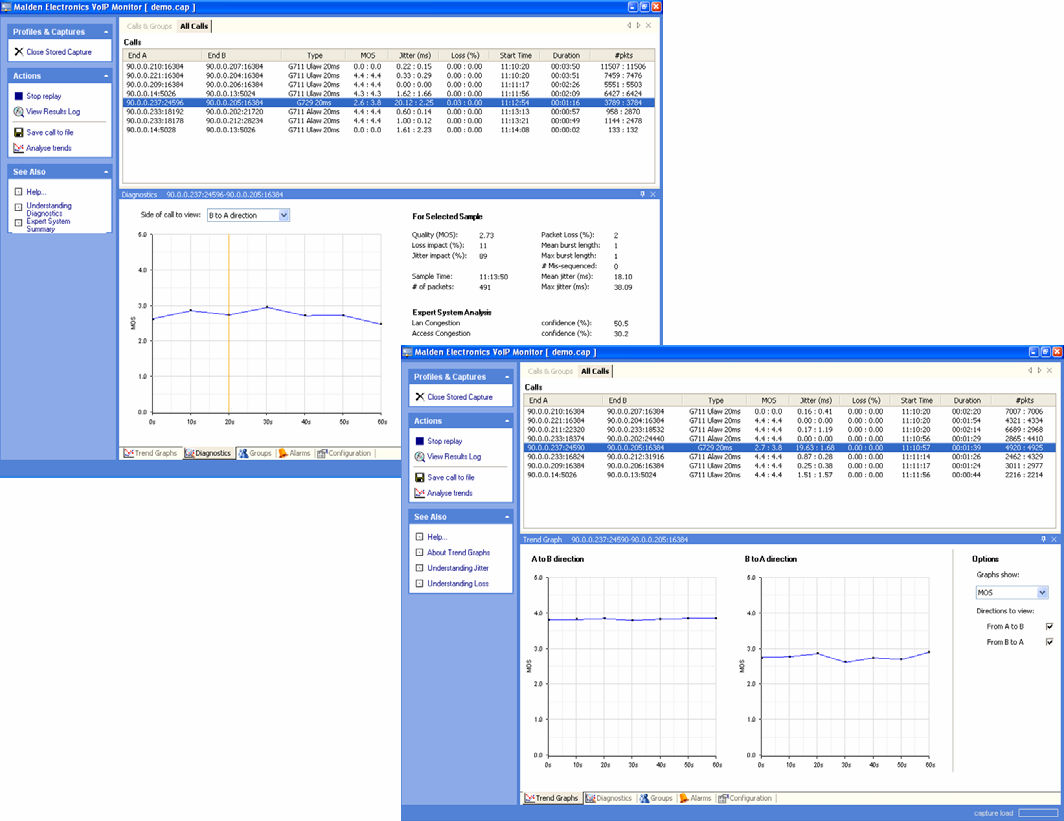
monitor or control our-made connection. For this purpose we use an
application from Malden Electronics - VoIP Monitor Professional. This is a software tool for
non-intrusive assessment of speech quality and measurement of RTP/RTCP traffic parameters in
VoIP networks. VoIP Monitor analyses the RTP traffic to produce real-time useful statistical -8- data and predictions of speech quality across a
single call or a number of calls. A calibration file,
tailored to the
gateway or VoIP
terminal refines the speech quality
prediction and gives a better
correlated Mean Opinion Score (MOS)
value than any other monitoring
method .
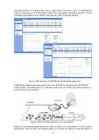
Figure 6.The interface of VoIP Monitor Professional application
VoIP Monitor Professional analyses the Voice over IP traffic by monitoring
live RTP/RTCP
traffic streams. The
performance of a VoIP transmission network can be characterised mainly in
terms of Packet Loss and Jitter.
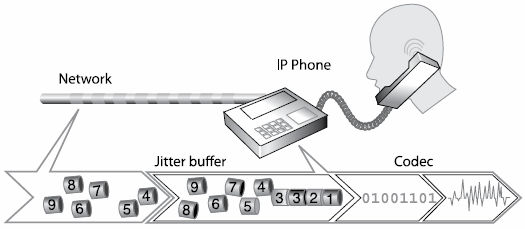
Figure 7.Jitter buffering and packet loss concealment
Packet loss can degrade speech quality but effective packet loss concealment can
cover up these
degradations. Jitter can also affect speech quality if it exceeds the
capacity of the jitter
buffer or
-9- the
dynamic jitter buffer algorithm is inadequate. The jitter buffers, codecs and packet loss
concealment techniques
influence the speech quality in IP phones and gateways differently and
there are
wide variations between brands, models and software versions. MOS, jitter and packet
loss
trends are presented graphically on the VoIP Monitor
screen . The Diagnostics feature gives
additional information about the percentage impact each parameter has on the degradation of
speech quality as well as indicating where the network problems lie.
Price
Finally, a calculation of all our costs presented in Table 1.
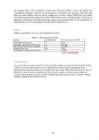
Table.1 - The calculation of price
Name Quantity [pc] Price per one pc. [EEK]
CISCO827 ADSL Router 2 870
3Com® Switch
4500 PWR 50-Port 2 25 380
ML Novator S570 server computer 2 16 400
Cable Cat 5E 10m 50 300
VoIP Monitor Professional software 1 1 600 101 900 EEK
Conclusion
As a conclusion, we want to say that we did our best to make our customer the best
offer (in this
work, however, the
final offer price is not presented as there is need in calculating all our
personal work and some money as our
benefit from our work). What about this project work, we
think that it may be used as a template for future work
projects as it shows many aspects in
solving some
questions in a field of VoIP: building and analyzing the project's scheme, finding
suitable equipment and software and etc.
- 10 - Referencies
http://www.voip-info.org/ http://www.usr.com/education/voip0.asp http://www.hypercomp.ru/ http://en.wikipedia.org/wiki/Voip http://www.malden.co.uk/voipmonitor.ht m
http://www.zoiper.com/ http://www.protocols.com/pbook/VoIPFamily.ht m
http://www.asterisk.org/ My
laboratory report on
subject "IRT0100 Kommunikatsioonivõrkude struktuurid ja teenused"
- 11 -
 50 punkti
Autor soovib selle materjali allalaadimise eest saada 50 punkti.
50 punkti
Autor soovib selle materjali allalaadimise eest saada 50 punkti.
 ~ 11 lehte
Lehekülgede arv dokumendis
~ 11 lehte
Lehekülgede arv dokumendis
 2009-01-24
Kuupäev, millal dokument üles laeti
2009-01-24
Kuupäev, millal dokument üles laeti
 69 laadimist
Kokku alla laetud
69 laadimist
Kokku alla laetud
 0 arvamust
Teiste kasutajate poolt lisatud kommentaarid
0 arvamust
Teiste kasutajate poolt lisatud kommentaarid
 audia
Õppematerjali autor
audia
Õppematerjali autor
 annaabi.ee












Kõik kommentaarid