Vajad kellegagi rääkida?
Küsi julgelt abi LasteAbi
Logi sisse

Programmeeritavad kontrollerid Labor 2 (0)

1 Hindamata
Punktid

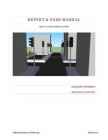
REPORT   &  USER   MANUAL   
TRAFFIC   LIG HTS CO NTR O L SY STEM  
 
 
ALEXANDER TARANENKO 
ANASTASSIJA MOROZOVA 
 
 
Tallinn  University  of Technology  
 
March 2013 
 
INTRODUCTION  
 
The  following  system  consists  of two Mitsubishi  AL2 controllers that  control  two crossroads , a 
pedestrian  crossing  and a parking  lot. The following implementation divides the  task   between  the 
two, but keeps controller one the main one and controller two the secondary one. The system can 
work  in two modes , automatic  and manual, the latter of which can also work in two separate sub-
modes that must be selected for each crosswalk individually. 
 
DESCRIPTION 
The control system consists of 2 Mitsubishi AL2 controllers. Each controller has: 
  8 buttons to navigate in the  menu  
  1 display  
  3 switches used to  change  the mode 
  1 switch to turn  controller on and off 
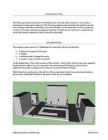
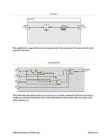
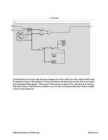
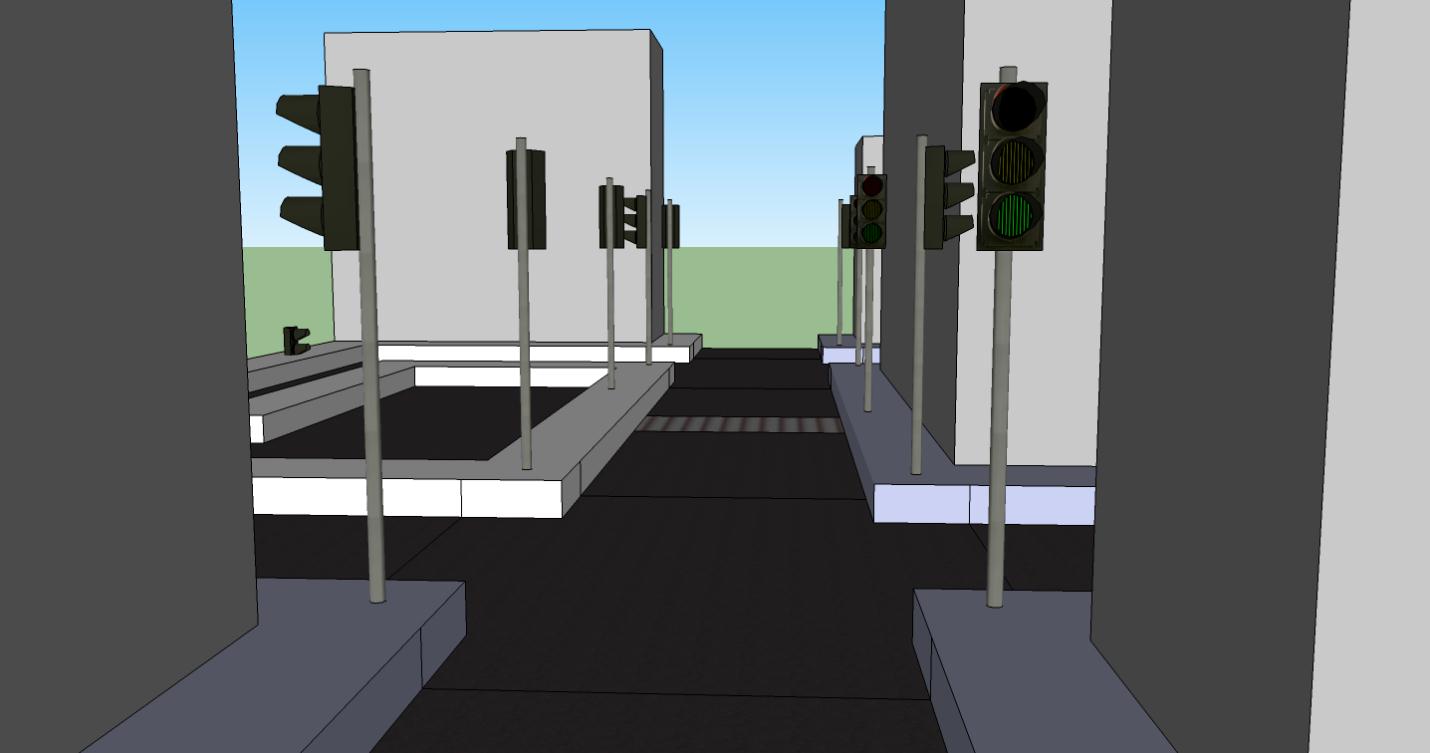
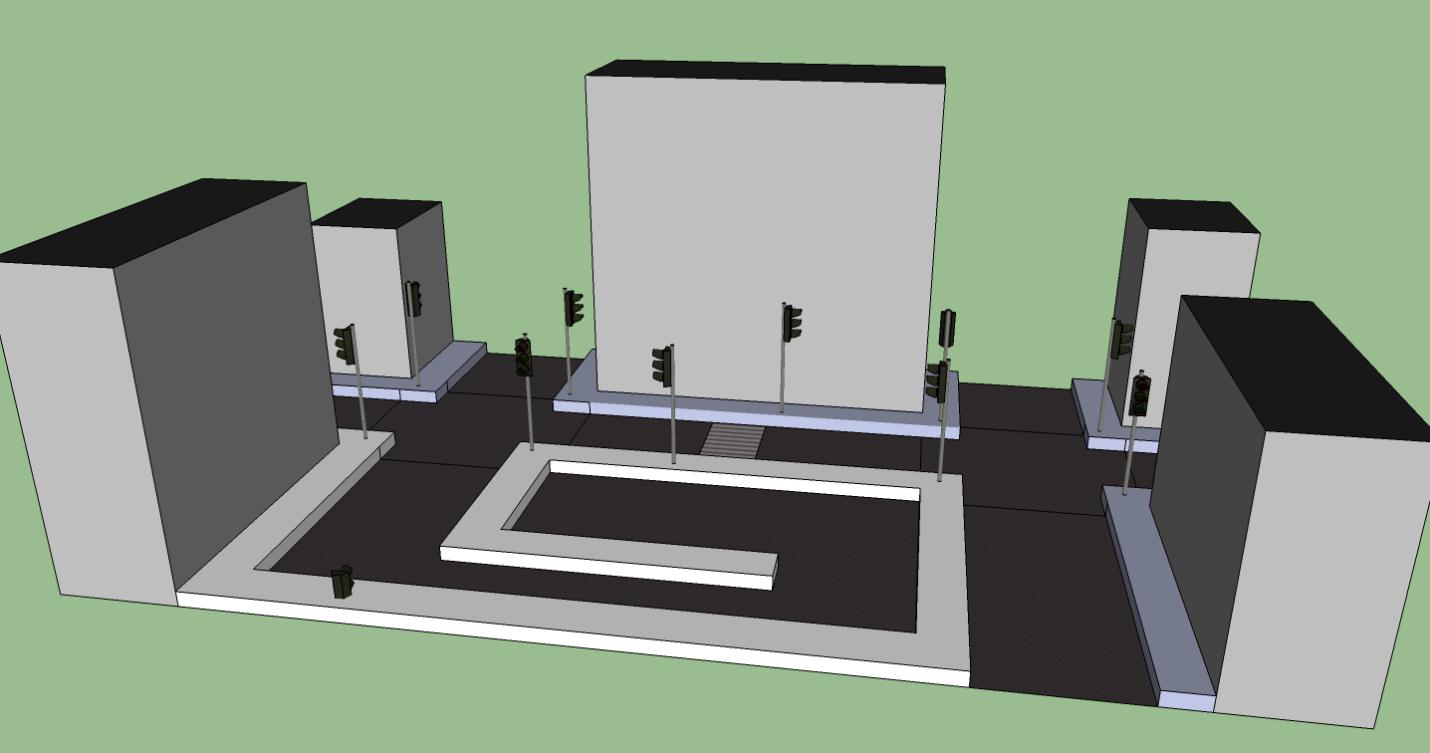
See the image below. The model consists of three streets – Main  Street , which, as the name suggests, 
has the de- facto right of way. It is crossed by Second Street and Third Street, and also has a 
pedestrian crosswalk crossing it with a button  to prompt the light  switching. 
Third Street has a parking lot at the end of it. The system keeps  track  of cars entering and exiting 
the lot, and a traffic light will inform the  driver  when the lot is  available
 
 
Tallinn University of Technology 
 
March 2013 
 
MODES 
In its initial state, the system is functioning in Automatic mode. By  turning  switch 3 on the main 
controller, Manual mode will be enabled on  both of the crossroads. At this point, each of the 
crosswalks can actually be toggled between  Democratic  mode and Main Street mode
 
AUTOMATIC MODE 
Automatic is the default mode. In this mode, the  sensors  are not active , and the  lights  switch 
automatically  back  and  forth after  fixed periods of time. In this  release , the time periods are 
equal, but it is possible to give lower -priority roads a smaller time window. This mode is 
suited to be used in  busy  hours of the day. 
To activate Automatic mode: 
  Put switch #3 on controller 1 into off  position
 
DEMOCRATIC MODE 
Democratic is the default manual mode. This  sensor  makes  full use of the sensors 
underneath the  road . Here, the light will change only when  there is a car next to the traffic 
light. After switching, the light will  stay  that way  until a car will activate a sensor on the 
other  road. This mode is suited to be used in low-traffic hours. 
To activate Democratic mode: 
  Put switch #3 on controller 1 into on position. 
  Put switch #4 on each controller into off position. 
 
MAIN STREET MODE 
Main Street mode is the second manual mode. Sensors are also used, but only on secondary 
roads. By default, Main Street is always given the right of way. When a car approaches from 
the secondary road and activates the sensor, light will change for a fixed amount  of time, 
and then return the right of way back to Main Street. This mode is sensible in  cases  where 
one road has significantly more traffic than the other one. 
To activate Main Street mode: 
  Put switch #3 on controller 1 into on position. 
  Put switch #4 on each controller into on position. 
 
Note  that it is not possible to change between Democratic and Main Street modes on the second 
crossroad from Controller 1. This is due to the limitations on the  link  between the two controllers. 

Tallinn University of Technology 
 
March 2013 
 
PARKING LOT 
The parking lot is  managed  by the second controller. A  green  light before the entrance indicates 
that there is  still at  least  one free parking  spot on the parking lot. The red light indicates that all of 
the parking spaces are taken. 
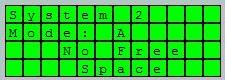
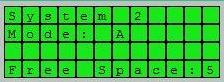
On the display of the second controller, a  message  will appear telling the viewer of what the actual 
amount of free spaces is. If there are no free spaces, an according message will appear. 
 
PEDESTRIAN CROSSWALK 
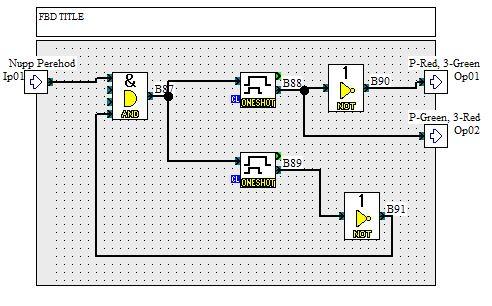
The  first  controller is also in control of the crosswalk. By default, the pedestrian light is set to red. 
When the crosswalk button is pressed, after a  brief  pause to  allow  the incoming  traffic to stop, a 
green light will light up for a period  of time. 
After that, the button will be inactive for a longer period of time. 
INPUTS AND OUTPUTS 
FIRST CONTROLLER  
SECOND CONTROLLER 
  2 analog inputs 
  2 analog inputs 
  2 controller switches 
  1 output for second controller 
  1 output for first controller 
  4 car sensors 
  4 car sensors 
  2 buttons 
  2 switches 
  1 button for pedestrian crossing 
  3 parking lot sensors 
traffic light 
  8 traffic lights outputs 
  First controller input 


Tallinn University of Technology 
 
March 2013 
 
IMPLEMENTATION 
The following section contains the actual ‘code’ that the controllers are  running . To simplify the 
understanding  and to make the scheme more manageable, most of the implementation is divided 
into user functions . The functions themselves will be provided and  described  below. 
FIRST CONTROLLER 
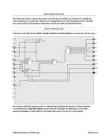
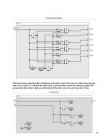
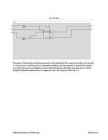
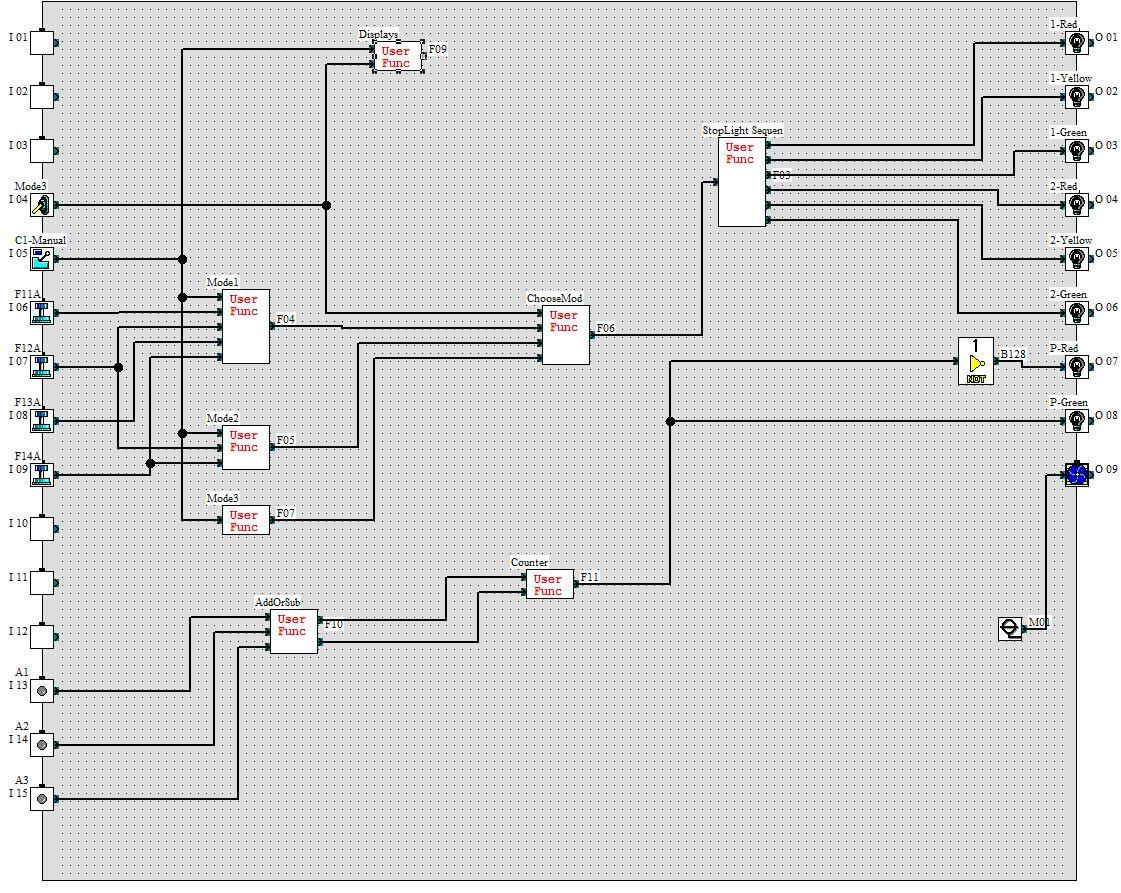
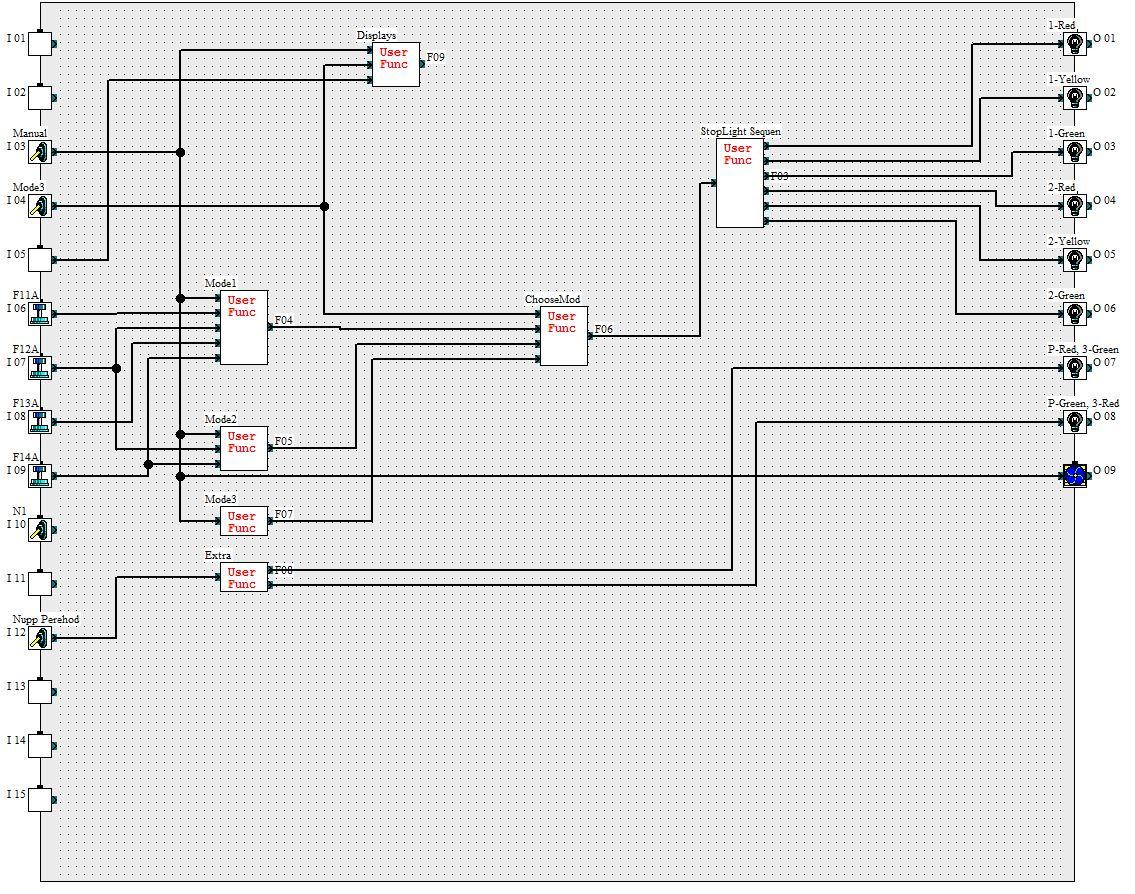
In the first controller, blocks  Mode1Mode2Mode3 and ChooseMod are associated with choosing 
the mode in which the system must be working . Extra describes the function  of the pedestrian 
crosswalk button, StopLight Sequen insures that the stoplights are  lighting  up in the right 
sequence. Displays is  responsible for the things that need to be shown on the display. 
 
 
Tallinn University of Technology 
 
March 2013 
 
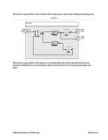
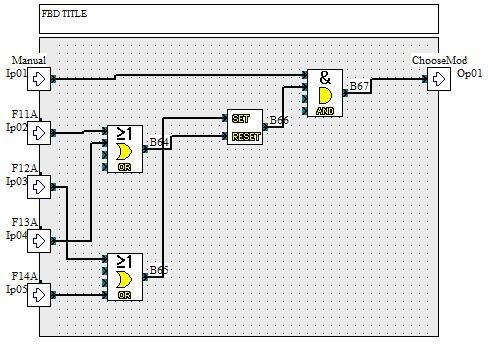
MODE 1 
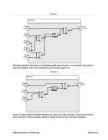
This block describes the  behavior of the Democratic manual mode. It is connected to the sensors 
near the stoplights, and is only activated once the manual signal is on. 
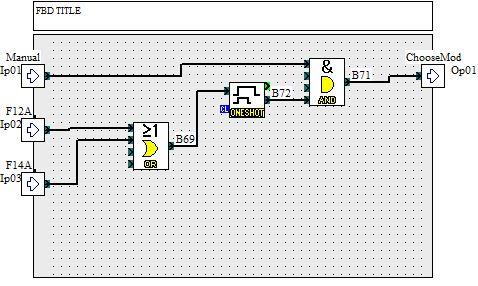
MODE 2 
Mode 2 is responsible for the Main Street mode. After one of the secondary street’s sensors have 
been activated, it will be sending a signal for a fixed amount of time, and then resetting it. 
Tallinn University of Technology 
 
March 2013 
 
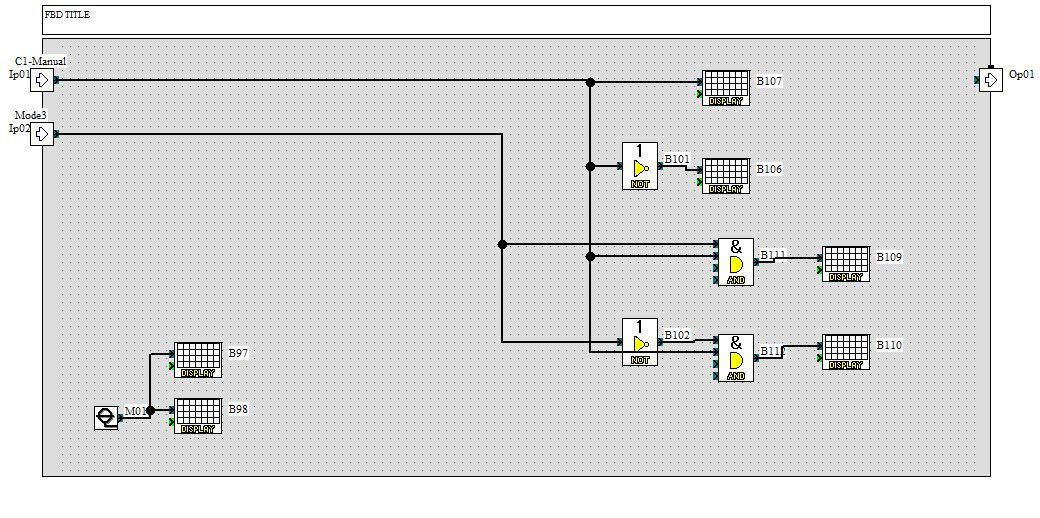
MODE 3 
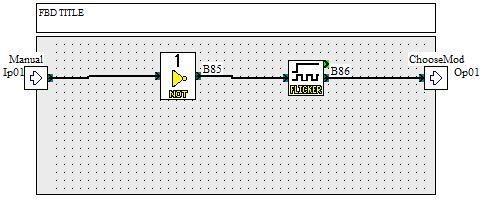
This small block is responsible for the automatic mode. When manual is off, it starts a  clock  with a 
period of 5 seconds
 
 
CHOOSEMOD 
This is the block that all the modes go to, and only one of them  is selected. Mode3 does not have a 
condition in this block, because it only  works  when Manual is off, and the other two modes work 
when manual is on. 
 
 
Tallinn University of Technology 
 
March 2013 
 
 
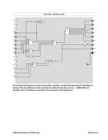
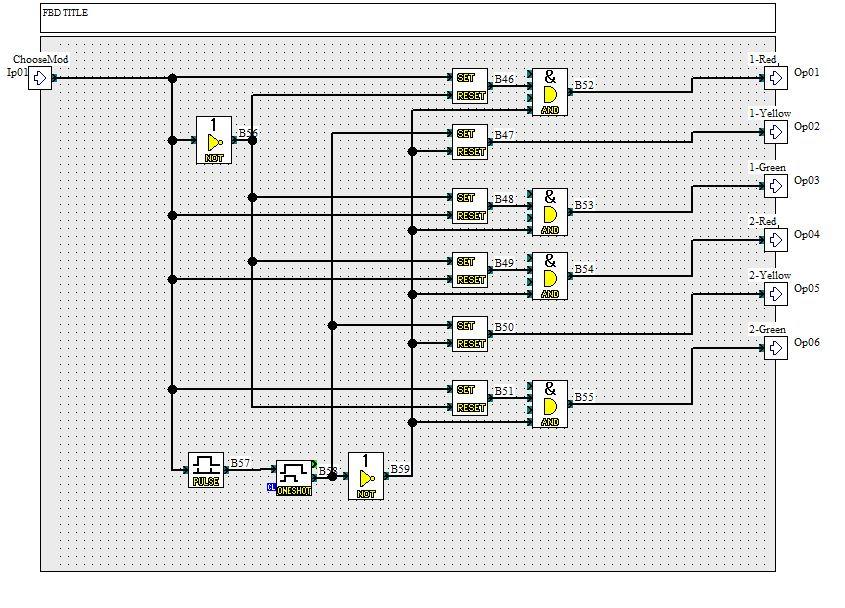
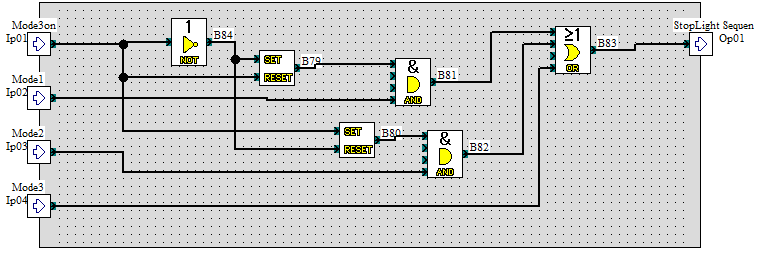
STOPLIGHT  SEQN  
This block ensures that the lights will light up in the right order. If the input is 0, Main Street has the 
right of way. Input of 1 will give the right of way to the secondary street. Any change in signal will 
prompt the yellow  light to light up, and disable all the other ones, for a short amount of time. 
DISPLAYS 
Tallinn University of Technology 
 
March 2013 
 
This block is responsible for the text that will be displayed on the  screen . Nothing  interesting  here. 
EXTRA 
This block is responsible for the behavior of the sidewalk button. Note that after the button is 
pressed, a feedback loop is activated that will prevent the button from being pressed again  and 
again. 
 
 
Tallinn University of Technology 
 
March 2013 
 
SECOND CONTROLLER 
Most of the user functions are the same in this controller, consult the pages above if something  is 
unclear. The only difference is that instead of an Extra block, there are two – AddOrSub and 
Counter , both of which are connected to the operation  of the parking lot. 
 
 
Tallinn University of Technology 
 
March 2013 
 
 
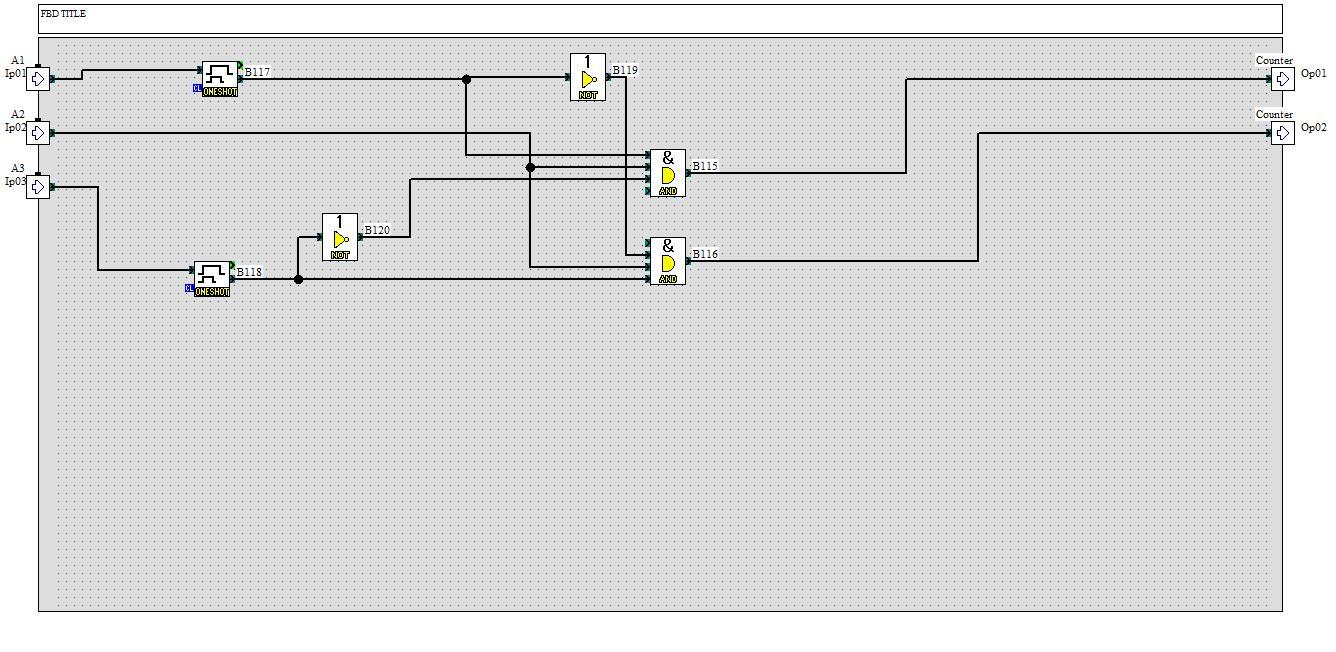
ADDORSUB 
The inputs of this block are the three sensors of the parking lot the outputs are either ‘one car less’ 
or ‘one car more’, and the  goal  is to determine whether a car has entered or exited the lot. When 
one of the side sensors is  triggered , a timer will start, during  which the opposing sensor will be 
disabled. When the  middle sensor is triggered, one of the outputs will be set to 1. 
 
 
Tallinn University of Technology 
 
March 2013 
 
 
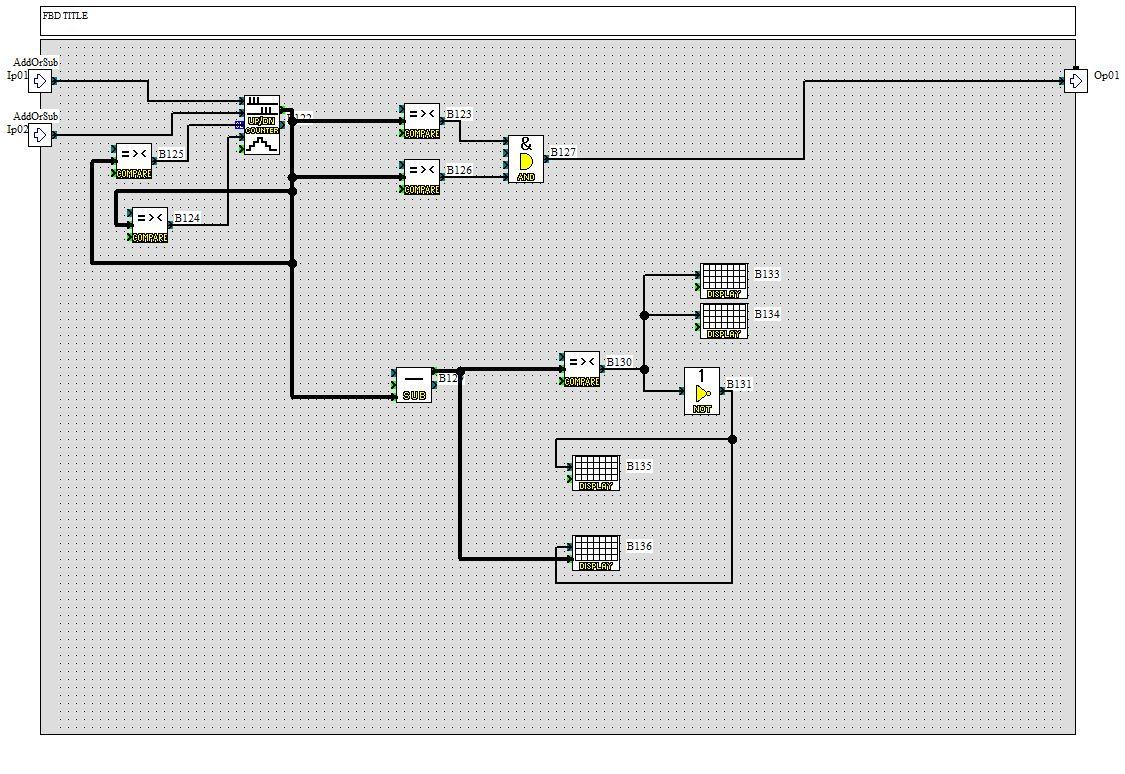
COUNTER 
Counter block does exactly what the name suggests, but with a little twist . The counter itself  counts  
the amount of cars in the parking lot. The part  beneath it subtracts that number from 5 and equals 
to the amount of free spaces.  The amount of free spaces is needed to be outputted on the screen. 
The actual output of this function is whether or not to turn on the green light (and off the red light) 
in  front  of the parking lot. 
Tallinn University of Technology 
 
March 2013 
 
Vasakule Paremale
Programmeeritavad kontrollerid Labor 2 #1 Programmeeritavad kontrollerid Labor 2 #2 Programmeeritavad kontrollerid Labor 2 #3 Programmeeritavad kontrollerid Labor 2 #4 Programmeeritavad kontrollerid Labor 2 #5 Programmeeritavad kontrollerid Labor 2 #6 Programmeeritavad kontrollerid Labor 2 #7 Programmeeritavad kontrollerid Labor 2 #8 Programmeeritavad kontrollerid Labor 2 #9 Programmeeritavad kontrollerid Labor 2 #10 Programmeeritavad kontrollerid Labor 2 #11 Programmeeritavad kontrollerid Labor 2 #12
Punktid 50 punkti Autor soovib selle materjali allalaadimise eest saada 50 punkti.
Leheküljed ~ 12 lehte Lehekülgede arv dokumendis
Aeg2013-06-04 Kuupäev, millal dokument üles laeti
Allalaadimisi 105 laadimist Kokku alla laetud
Kommentaarid 0 arvamust Teiste kasutajate poolt lisatud kommentaarid
Autor alexandertaranenko Õppematerjali autor
Teine Labor (Esimene eelmisel aastal). Valgusfooride makett.

Sarnased õppematerjalid

Book Analog Interfacing to Embedded Microprocessors
568
pdf

Book Analog Interfacing to Embedded Microprocessors

Analog Interfacing to Embedded Microprocessors Real World Design Analog Interfacing to Embedded Microprocessors Real World Design Stuart Ball Boston Oxford Auckland Johannesburg Melbourne New Delhi Newnes is an imprint of Butterworth–Heinemann. Copyright © 2001 by Butterworth–Heinemann A member of the Reed Elsevier group All rights reserved. No part of this publication may be reproduced, stored in a retrieval system, or transmitted in any form or by any means, electronic, mechanical, photocopying, recording, or otherwise, without the prior written permission of the publisher. Recognizing the importance of preserving what has been written, Butterworth–Heinemann prints its books on acid-free paper whenever possible. Library of Congress Cataloging-in-Publication Data Ball, Stuart R., 1956– Analog interfacing to embedded microprocessors : real world design / Stuart Ball. p. cm. ISBN 0-7506-7339-7 (pbk. : alk. paper) 1. Embedded computer

Mehhatroonika
CPM1A Programmable Controllers Operation Manual 1784470
402
pdf

CPM1A Programmable Controllers Operation Manual 1784470

Cat. No. W317-E1-11 SYSMAC CPM1A Programmable Controllers OPERATION MANUAL CPM1A Programmable Controllers Operation Manual Revised October 2007 iv Notice: OMRON products are manufactured for use according to proper procedures by a qualified operator and only for the purposes described in this manual. The following conventions are used to indicate and classify precautions in this manual. Always heed the information provided with them. Failure to heed precautions can result in injury to people or dam- age to property. ! DANGER Indicates an imminently hazardous situation which, if not avoided, will result in death or serious injury. Additionally, there may be severe property damage. ! WARNING Indicates a potentially hazardous situation which, if not avoided, could result in death or serious inju

Automatiseerimistehnika
Tööstuslik andmeside kontrolltöö 2 abimaterjal - vastused
3
doc

Tööstuslik andmeside kontrolltöö 2 abimaterjal - vastused

oData transparency: In bit and byte oriented protocols, there is a problem if a control character (for ETX (End of Text) ·Same as ETB, only no more blocks will follow. ITB (End of > Differences with HDLC ­ length of protocol field (1B or 2B) byte-oriented protocols) or the start-of-frame flag (for bit-oriented protocols) appears in the actual data. Intermediate Transmission Block) ·Same as ETB, except that the receiving statio Differs from HDLC because of multiaccess MAC that provides · Maximum payload length (default: 1500) This was not likely to happen in ASCII text, but is very likely with binary data. This is known as a data will not acknowledge after the error checking. EOT (End of Transmission) framing/error detection: · Type of CRC (2B or 4B) transparency problem an can be rectified with byte stuffing (for byte-orien

Tööstuslik andmeside
Photographic camera
18
docx

Photographic camera

2 Photographic camera & photography (SEBA)  Photographic camera is an equipment used for taking photographs (usually consisting of a lightproof box with a lens at one end and light-sensitive film at the other)  Photography is The art or practice of taking and processing photographs. 3 Context of the creation of the camera (CARLA)  The camera has been used since before Christ. The impact in society the emergence of the camera was important and shocking because it helped us capture important moments in time that can no longer be repeated and helped a lot in the field of communication. The first models of cameras were used in the years before Christ where they were used to see closely objects. After its emergence was marked a before and after in history because thanks to this artefact can capture exact moments in which a event happened. Advancing in history have improved the types of cameras, passing cameras that took several min

Inglise keel
Piletid vastustega
13
docx

Piletid vastustega

Ticket No1 1)The characteristic is called output characteristic or volt-ampere charateristic of a Rectifier Diode. 2)Rectifier Diode. 3) A is called Anode and C is called Cathode. An Anode has positive potential and therefore collects electrons in the device. Cathode has negative potential and therefore emits electrons to anode. The symbol looks like an arrow that ponts from the anode to the cathode, and reminds that conventional current flows easily from the p side(anode) to the n side(cathode). BIASING. Forward biasing. If the current in a diode is too large, excessive heat will destroy the device. Even approaching the burnout current value without reaching it can shorten its life. Therefore manufacturer's data sheet specifies the maximum forward current, that diode can withstand. This average current IF is the rate a diode can handle up to the forward direction when used as a rectifier. Another entry of interest in the da

Elektroonika jõupooljuht tehnika
Thesis Kivimaa August 2022
140
pdf

Thesis Kivimaa August 2022

Thesis “How is it possible to calculate IT security effectiveness?” Kristjan Kivimaa August 2022 1 Abstract In IT Security world, there is lack of available, reliable systems for measuring security levels/posture. They lack the range of quantitative measurements and easy and fast deployment, and potentially affects companies of all sizes. Readily available security standards provide qualitative security levels, but not quantitative results – that would be easily comparable. This deficiency makes it hard for companies to evaluate their security posture accurately. Absence of security metrics makes it complicated for customers to select the appropriate measures for particular security level needed. The research question for this research project is – “How is it possible to calculate IT security effectiveness?”. The aim of this research is to use this reference m

Infotehnoloogia
ECDIS Voyage planning
31
ppt

ECDIS Voyage planning

Voyage Planning Voyage Planning The key elements of the Voyage Plan are:  Appraising all relevant information  Planning the intended voyage  Executing the plan taking account of prevailing conditions  Monitoring the vessel’s progress against the plan continuously Planning  The detailed voyage or passage plan should include the following factors: 1) the plotting of the intended route or track of the voyage or passage on appropriate scale charts: the true direction of the planned route or track should be indicated, as well as all areas of danger, existing ships' routeing and reporting systems, vessel traffic services, and any areas where marine environmental protection considerations apply; 2) the main elements to ensure safety of life at sea, safety and efficiency of navigation, and protection of the marine environment during the intended voyage or passage; such elements should include, but not be limited

Navigeerimine
Optional use of ECDIS
120
pdf

Optional use of ECDIS

Facts about charts and carriage requirements Primar Stavanger – IC-ENC Working Group on information (PSIWG) 1st edition - November 2004 Kort & Matrikelstyrelsen Graphic design: Peter M. Bastrup, KMS This compendium may be reproduced in whole or in part provided that all extracts quoted are reproduced verbatim without adaptation and the source and date are stated. Primar Stavanger and IC-ENC shall be indentified as the originators of the compendium. 2 Facts about chart carriage reguirements CONTENTS Introduction . . . . . . . . . . . . . . . . . . . . . . . . . . . . . . . . . . . . . . . . . . . . . . . . . . . . . . . . . .4 Where are the rules for professional marine navigation written down? . . . . . . . . . . .6 What are the IMO requirements for the carriage of nautical charts? . . . . . . . . . . . . .6 What is a nautical chart? . . .

Merendus


Meedia

Kommentaarid (0)

Kommentaarid sellele materjalile puuduvad. Ole esimene ja kommenteeri


Sellel veebilehel kasutatakse küpsiseid. Kasutamist jätkates nõustute küpsiste ja veebilehe üldtingimustega Nõustun